Jumat, 29 Juli 2011

Internet


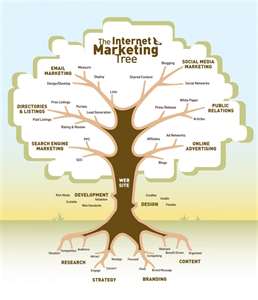
The Internet is a network of computers that could be categorized as a WAN, connecting millions of computers around the world, without borders, where every person who has a computer can join the network by simply connecting to the internet service provider (internet service provider / ISP) such as Telkom Speedy , or Indosatnet. The Internet can be translated as an international networking (international network), for connecting computers internationally, or as internetworking (networking between networks) for network connecting millions around the world.

The Internet started when the U.S. Department of Defense (Department of Defense, USA) built a computer network in 1969, which was named ARPANET (Advanced Research Project Agency Network) in order to connect multiple computers within its universities doing military research, especially to build a network computer communication that is able to withstand nuclear attack. These networks continue to grow, more and more computers are involved, and the research side of software development is also growing. In May 1974, Vinton G. Cerf of Stanford University and Robert E. Kahn of the Department of Defense, USA, published a paper in IEEE Transaction on Communication entitled "A Protocol for Packet Network Intercommunication", the concept was later popular as a TCP / IP , when the ARPANET had adopted the protocol into standard protocols for ARPANET in 1983. The university, especially the University of California at Berkeley and then build the operating system of the Berkeley Software Distribution Unix) or BSD UNIX (known as Free BSD Unix) and the department of defense finance Bolt Baranek and Newman (BBN) for the implementation of the protocol to TCP / IP in BSD Unix to be implemented on the ARPANET, the forerunner of the Internet thus formed.

At the end of 1983, the ARPANET network divided into DARPANET (Defence ARPANET) and MILNET (Military Network). In 1985 the network was formed NFSNET (National Science Foundation Network) to connect the existing supercomputer in various universities in America and is connected to the ARPANET. NSFNET network developed by researchers continue to college. In 1988 the Internet backbone network is only a capacity of 56 Kbps. Although in 1990 the ARPANET officially closed, but the Internet network that has formed forwarded by the university in the United States and enter the university network in the Americas (Canada and South America) and networks in Europe to be part of the Internet. In 1992 the network backbone upgraded to T3 with a speed of 45 Mbps, and around 1995, increased again to OC-3 at a speed of 155 Mbps. Now the high-speed Internet backbone in order Gbps.

Internet topology is basically a mesh-topology, linking many types of networks via packet-switching systems, even if it can be said that the center of its are some of the NAP (Network Access Point) in San Francisco (Pacific Bell), Chicago (Ameritech) , New Jersey (Sprint), and Merit Access Exchange (MAE) in San Francisco (MAE West) and Washington, DC (MAE East) is handled by MFS Datanet.

Although no organization has the internet, but there are many organizations that maintain these networks through the establishment of standardization of protocols, rules, and access methods. Internet Engineering Task Force (IETF) to handle the technical problems that arise on the Internet, such as problems in the protocol, the architecture and operation of the Internet. Internet Research Task Force (IRTF) to handle the technical research, such as the addressing system and other engineering. Internet Assigned Numbers Authority (IANA) controls the distribution of IP address (IP #) to various countries and organizations. Internet Society (ISOC) to handle administrative and organizational structure of the Internet.

Commercial entity then provides access services to provide connections from the user's computer to the Internet, and the agency is called Internet access provider or ISP. Some well-known ISP in the world is America On Line (AOL), Australia OnLine, CompuServe, Genie, and Prodigy. In Indonesia there are TelkomNet, Indosatnet, Wasantara Net, InterNux, and so on. ISPs provide dial-up connection via a modem-telephone, wireless connection through WLAN antenna, or ADSL connection via the telephone. Connection protocol used is SLIP (Serial Line Interface Protocol) or PPP (Point-to-Point Protocol), where the SLIP connection is usually slower than the PPP.
READ MORE - Internet

Jumat, 15 Juli 2011

Client-server

Client-server networking grew in popularity many years ago as personal computers (PCs) became the common alternative to older mainframe computers. Client devices are typically PCs with network software applications installed that request and receive information over the network. Mobile devices as well as desktop computers can both function as clients.

A server device typically stores files and databases including more complex applications like Web sites. Server devices often feature higher-powered central processors, more memory, and larger disk drives than clients.

Client-Server is one of the computer Industries newest and hottest buzzwords. There is no generic definition of client/server as it is used to depist number of nature, developing, and anticipateologies. However the general idea is that clients and servers are separate logical entities that work together Attention over a network to accomplish a task.

Client-server is very fashionable. As such, it might be just a temporary fad; but there is general recognition that it is something fundamental and far-reaching; for example, the Gartner Group, who are leading industry analysts in this field, have predicted that

"By 1995 client-server will be a synonym for computing."
Most of the initial client/server success stories involve small-scale applications that provide direct or indirect access to transactional data in legacy systems. The business need to provide data access to decision makers, the relative immaturity of client/server tools and technology, the evolving use of wide area networks and the lack of client/server expertise make these attractive yet low risk pilot ventures. As organizations move up the learning curve from these small-scale projects towards mission-critical applications, there is a corresponding increase in performance expectations, uptime requirements and in the need to remain both flexible and scalable. In such a demanding scenario, the choice and implementation of appropriate architecture becomes critical. In fact one of the fundamental questions that practitioners have to contend with at the start of every client/server project is - "Which architecture is more suitable for this project - Two Tier or Three Tier?". Interestingly, 17% of all mission-critical client/server applications are three tiered and the trend is growing, according to Standish Group International, Inc., a market research firm.

Architecture affects all aspects of software design and engineering. The architect considers the complexity of the application, the level of integration and interfacing required, the number of users, their geographical dispersion, the nature of networks and the overall transactional needs of the application before deciding on the type of architecture. An inappropriate architectural design or a flawed implementation could result in horrendous response times. The choice of architecture also affects the development time and the future flexibility and maintenance of the application. Current literature does not adequately address all these aspects of client/server architecture. This paper defines the basic concepts of client/server architecture, describes the two tier and three tier architectures and analyzes their respective benefits and limitations. Differences in development efforts, flexibility and ease of reuse are also compared in order to aid further in the choice of appropriate architecture for any given project.

Chapter-2
History & defintion:-
History

The University of Waterloo implemented Oracle Government Financials (OGF) in May of 1996. That moved UW's core accounting systems to a vendor-supported package on a Solaris/Unix environment and away from locally developed package(s) on IBM/VM. Plans at that time were to move more (if not all) business systems to a single vendor and to standardize on a single Data Base platform (Oracle for both). A very large state of the art Solaris system was purchased with the intention of co-locating these other Oracle supplied services on the same system with the OGF. Network security architecture was planned that involved isolating administrative networks, fire walling those networks with protocol filters and active traffic monitoring. Systems were purchased and deployed to implement that security architecture.
Much has changed in the interim. While the OGF now includes more services beyond the 1996 suite the plans to move all business systems has failed. Notably, we require People Soft/HRMS (Human Resources Management System) for Payroll (deployed in fourth quarter 1998) with People Soft/SIS (Student Information Services) to follow some years hence—Oracle was unable to deliver these key components for our business. Also we've discovered, while it's reasonable to require Oracle as the Data Base when other applications are specified, it's unreasonable to expect that they will be certified with the same versions of the Oracle Data Base and/or the underlying operating system. Technology changes quickly too: the state of the art Solaris system is no longer current. Networks were restructured to isolate administrative systems in the "Red Room" and administrative users throughout the campus. However, the administrative firewall and active traffic monitor was never implemented - recently it's been dismantled.
READ MORE - Client-server

Plug and Play


Devices (Plug and Play and non-Plug and Play) can be connected to your computer in several ways. Some devices, such as network adapters and sound cards, are connected to expansion slots inside your computer. Other devices, such as printers and scanners, are connected to ports on the outside of your computer. Some devices, known as PC Cards, connect only to PC Card slots on a portable computer.

For a device to work properly with Windows, software known as a device driver must be installed on the computer. Each device is supported by one or more device drivers, which are typically supplied by the device manufacturer. However, some device drivers are included with Windows. If the device is Plug and Play, Windows can automatically detect it and install the appropriate device drivers.

If the device is not automatically installed by Windows, the Found New Hardware Wizard will appear and ask you to insert any media (such as compact discs or floppy disks) that were provided with the device. Non-Plug and Play devices are installed using the Add Hardware Wizard in Control Panel. If you want to manually install device drivers, you must use Device Manager Before manually installing device drivers, you should consult the device documentation provided by the manufacturer.

Important

You must be logged on as an administrator or as a member of the Administrators group in order to install or configure a device if:

The device driver does not have the Designed for Windows Logo or a digital signature
Further action is required to install the device, requiring Windows to display a user interface.
The device driver is not already on your computer.
You need to configure a device using Device Manager.
Your computer is connected to a network; network policy settings may also prevent you from installing hardware.
READ MORE - Plug and Play

RMON


RMON are the functions that monitor the network performance, errors and other summary information. RMON functions can be implemented in a network device (HUB, LAN switch) or a station (PC, Server).

The Remote Network Monitoring (RMON) specification was created. RMON is often called a protocol, and you will sometimes see SNMP and RMON referred to as “the TCP/IP network management protocols”. However, RMON really isn't a separate protocol at all—it defines no protocol operations. RMON is in fact part of SNMP, and the RMON specification is simply a management information base (MIB) module that defines a particular set of MIB objects for use by network monitoring probes. Architecturally, it is just one of the many MIB modules that comprise the SNMP Framework.

RMON (Remote Network Monitoring) provides standard information that a network administrator can use to monitor, analyze, and troubleshoot a group of distributed local area networks (LANs) and interconnecting T-1/E-1 and T-2/E-3 lines from a central site. RMON specifically defines the information that any network monitoring system will be able to provide. It's specified as part of the Management Information Base (MIB ) in Request for Comments 1757 as an extension of the Simple Network Management Protocol (SNMP). The latest level is RMON Version 2 (sometimes referred to as "RMON 2" or "RMON2").

RMON can be supported by hardware monitoring devices (known as "probes") or through software or some combination. For example, Cisco's line of LAN switches includes software in each switch that can trap information as traffic flows through and record it in its MIB. A software agent can gather the information for presentation to the network administrator with a graphical user interface. A number of vendors provide products with various kinds of RMON support.

RMON collects nine kinds of information, including packets sent, bytes sent, packets dropped, statistics by host, by conversations between two sets of addresses, and certain kinds of events that have occurred. A network administrator can find out how much bandwidth or traffic each user is imposing on the network and what Web sites are being accessed. Alarms can be set in order to be aware of impending problems.
READ MORE - RMON
READ MORE - RMON

Kamis, 14 Juli 2011

ACEs


Access control in its basic definition can be anything from scanning your work badge for permit into your employment facility to the old fashion way of handing in a movie ticket for theatre access. It’s the idea and process by which people are identified and granted certain access and in most cases privileges.

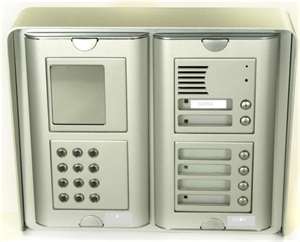
Furthermore, computerized access control systems can be security devices that monitor and control entry to a house, apartment, or building. Because keys are easily duplicated, these systems are the best way to keep track of who is entering the area.

When it comes to your business, access control can be designed to restrict access to your building complex in order to increase security and control. There are now access control systems that do away with keys all together and provide computerized trails of who and when someone enters your property.

Access control devices can range from simple electronic keypads that secure a single door to large networked security systems for multiple buildings that can include parking lot gates, integration with time and attendance systems, exit controls, telephone entry, and multiple other levels of security. If a business owner implements sophisticated access control, there should be no need to replace lost keys, track down keys from terminated employees, or wonder who has access to which areas.

If you are seriously considering applying electronic access control devices within your business then know that the local and state law likely will require certain standards which will cost you time and money.

Access control is also important when it comes to work computers and programs, as well as personal computers. Any computer that is networked to any outside source is vulnerable. That is why you can now guard computer and program access with passwords, fingerprint identification, and even more means such as voice recognition or even retinal scans.

Meanwhile, access control from a homeowner’s point of view does not have to be costly and can help prevent unauthorized access onto your property and uphold safety once inside. Such access control devices can be applied to locksets, entry and exit control, even TV and computer privileges.

One of the most common access control devices found in the residential area is an electronic entry gate. Even if you have fencing around your home, you should consider installing a security gate in which people must enter an access code in order to gain entry into your driveway and into your home

ACLs can be used to filter traffic for various purposes including security, monitoring, route selection, and network address translation. ACLs are comprised of one or more Access Control Entries (ACEs). Each ACE is an individual line within an ACL.

ACLs on a Cisco ASA Security Appliance (or a PIX firewall running software version 7.x or later) are similar to those on a Cisco router, but not identical. Firewalls use real subnet masks instead of the inverted mask used on a router. ACLs on a firewall are always named instead of numbered and are assumed to be an extended list.

Access Control Entries (ACEs) provide a mapping of user groups to containers. There are five types of ACEs:
User Explicitly identifies an individual user and overrides any other ACE.
Same company Identifies the host organization. This ACE, called People in my company in the Communicator user interface, typically resides in the Company Container. By default, every user in the organization is a member of the Company Container unless the user is explicitly given membership in another container. For example, in Figure 6 above, roy@contoso.com and carl@contoso.com have Team level access
Domain ACE Identifies all users who are members of a specified SIP domain. This ACE is called people in in the Communicator user interface. As shown in Figure 6 above, msn.com is a member of the Public Container, so every member of the msn.com domain can see the user information that is included in the Public Container.
Federation ACE Identifies all users from partner organizations that are federated with the host organization. This ACE is called people in domains connected to my company in the Communicator user interface. For details about federation, see the Microsoft Office Communications Server 2007 Planning Guide.
Public Internet connectivity (PIC) ACE Identifies all users who belong to supported public IM service providers, which can include the MSN network of Internet services, Yahoo!, and AOL. Public Internet connectivity requires a separate license. This ACE is called people in public domains in the Communicator user interface. For details, see the Microsoft Office Communications Server 2007 Planning Guide.
READ MORE - ACEs
READ MORE - ACEs

RJ45


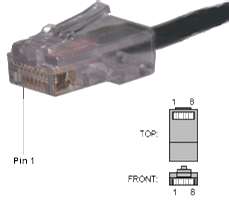
The wires used for a LAN are mostly those headed by an RJ45 jack, which is similar to the jack plugged into your telephone set, but twice as big. Some Ethernet networks use coaxial cables, but that’s rarer, and present in rather large LANs, which span over areas between buildings. If you want to see what a coaxial cable is like, look at the thick cable that links your TV antenna to your TV set.

Ethernet is by far the most popular LAN protocol used today. It is so popular that if you buy a network card to install on your machine, you will get an Ethernet card, unless you ask for something different, if of course that different protocol is available.

Ethernet has evolved over the years. Today, you can get cheap Ethernet LAN cards with speeds up to 100 Mbps; while the fastest Ethernet reaches Gbps (1 Gbps = 1000 Mbps) in speed.
READ MORE - RJ45
READ MORE - RJ45

Switches


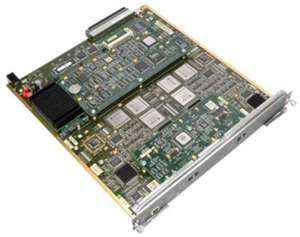
Switches allow us to create a "dedicated road" between individual users (or small groups of users) and their destination (usually a file server). The way they work is by providing many individual ports, each running at 10 Mbps interconnected through a high speed backplane. Each frame, or piece of information, arriving on any port has a Destination Address field which identifies where it is going to. The switch examines each frame's Destination Address field and forwards it only to the port which is attached to the destination device. It does not send it anywhere else. Several of these conversations can go through the switch at one time, effectively multiplying the network's bandwidth by the number of conversations happening at any particular moment.

Another analogy which is useful for understanding how switches increase the speed of a network is to think in terms of plumbing. For sake of argument, assume that every PC on a network is a sink, and a 10 Mb/s connection is a 1/2-inch pipe. Normally, a 1/2-inch pipe will allow enough water to flow for one or two sinks to have enough water pressure to fill quickly. However, putting more sinks on that same 1/2-inch pipe will drop the water pressure enough that eventually the sinks take a very long time to fill.

To allow all sinks to fill quickly, we can connect the source of water to a larger (6-inch) pipe, and then connect each sink to the 6-inch pipe via its own 1/2-inch pipe. This guarantees that all sinks will have enough water pressure to fill quickly. See Figure One for an image of this concept.

Most network operating systems now use a "Client-Server" model. Here, we have many network users, or "clients" accessing a few common resources, or "servers." If we look at our previous highway example, an analogy would be to have a hundred roads for individuals all converging at two or three common points. If these common points are the same width as our individual roads, then they cause a major bottleneck, and the end result is exactly the same as if everyone was sharing one small road. This totally defeats the purpose of building all the individual roads in the first place.

The solution is to widen the road to our shared resource so that it can support the full load of most or all of the individual roads at once. In other words, we increase the bandwidth to our servers while connecting our clients at 10 Mbps. This is usually referred to as a High Speed Backbone. In networking slang, it is commonly called a "Fat Pipe."

This layout is splitting our overall network into four subnetworks. From left to right these subnetworks are outlined in Red, Green, Blue, and Violet. The Red subnetwork is a shared 10 Mbps setup, with all of the "Undemanding Users" sharing 10 Mbps of bandwidth. The Green and Blue subnets are dedicated 10 Mbps connections, sometimes referred to as "Private Ethernets." Here, each of the two power users has 10 Mbps of bandwidth dedicated to his or her machine, and this bandwidth is not shared with anyone else. Finally, we have our Violet subnetwork. This one is a Fast Ethernet setup running at a speed of 100 Mbps, and the bandwidth is shared by the two servers.

This is the most common way of setting up a switched network, and almost always results in an optimal price/performance ratio. We limit the amount of expensive Fast Ethernet hardware needed by only using it where its cost is justified by the performance it gives in handling the load at that point in the network, while leveraging an existing investment in 10 Mbps equipment in less demanding parts of the network. As a 10/100 switch is a fairly costly piece of equipment, each port we dedicate to a user is also rather expensive, so again these are only dedicated to individual users where that user's load justifies it. Finally, we can set up shared subnetworks which lump anywhere from two up to 100 users on one switch port.
READ MORE - Switches
.::BY JUMBHO MY AT HOME IN THE JEPARA CITY OF BEAUTIFUL::.